3 AI Product Manager Portfolio Projects That Get You Interviews
You don’t need a job title to prove you can do the job. You need proof of work. Build three […]
Why does proof of work beat certificates?
A portfolio with one real thing you built and can reason about beats a stack of certificates every time. That is the whole game.
Certificates say you consumed content. Proof of work says you can do the job. A hiring manager can tell the difference in about two minutes, and they are looking for it hard, because most applicants have the vocabulary and none of the judgment.
More than 2,800 of our alumni now work in product roles, and the pattern among the fastest is consistent. They are rarely the people with the most courses. They are the people with one or two real things they built and can talk through, decision by decision. These three projects are designed to make you that person. Each proves something different, so together they cover what a hiring manager actually screens for.
Project 1: Ship a small AI product (proves you can build)
What it proves: you can take a real problem, build a working AI solution, and make the product decisions along the way. This is the single most convincing thing in an AI PM portfolio, because almost no one applying has actually shipped anything.
What to build. Pick one small, real problem and ship a working prototype using a no-code AI app builder (Lovable, v0, Bolt, and similar). A good starter: a feedback-triage tool that takes a pile of user feedback and returns the top themes, with a count and an example quote for each. It is genuinely useful, and it uses AI for something AI is good at: reading messy text and grouping it.
You do not need to code. You need to make the calls a PM makes.
Start with a real spec. Before you touch a tool, write one paragraph. Here is the actual spec for the feedback tool, so you can see the level:
Feedback Triage: Paste in up to 200 raw user comments. The tool returns the top 5 themes, each with a count and one real example quote. The one thing it must get right: every theme and quote must come from the actual comments. It must never invent a theme that isn’t there. Users: a solo PM drowning in support tickets before a planning cycle.*
That last line, the one thing it must get right, is the PM part. It is the difference between “make an AI thing” and “design an AI thing that is trustworthy.”
Then build it in five moves:
- Scaffold the page. Describe the app to the builder in plain English: an input box for comments, a button, and a results area with theme, count, and quote. Let it generate the interface.
- Write the AI instruction, and design against hallucination in it. This is the line that matters. Something like: “Group these comments into at most 5 themes. For each theme, give a count and one exact quote copied from the comments. Only use themes that actually appear. If you are unsure, use fewer themes. Never invent a theme or a quote.”
- Test with messy input, not clean input. Feed it 50 real comments with typos, sarcasm, and off-topic noise, not 10 tidy ones. Real input is where AI products break.
- Iterate on the actual failures. You will see them: a summary that runs too long, counts that don’t add up, a theme nobody wrote. Fix each by editing the instruction, not the code. Example fix: counts kept drifting, so add “the counts must sum to the number of comments you were given.”
- Ship it and grab two screenshots: the messy input and the clean output.
What to write up (one page): the problem, your spec, the two or three real decisions you made (why you capped it at 5 themes, how you stopped it hallucinating), what broke, and the exact change that fixed it, and one line on what you’d build next. The full build, including the prompts, lives in our vibe-coding-for-PMs walkthrough (publishing soon; link to follow).
The write-up matters as much as the build. A hiring manager can’t watch you work, so the decisions have to be on the page.
Project 2: Tear down an AI product (proves you have judgment)
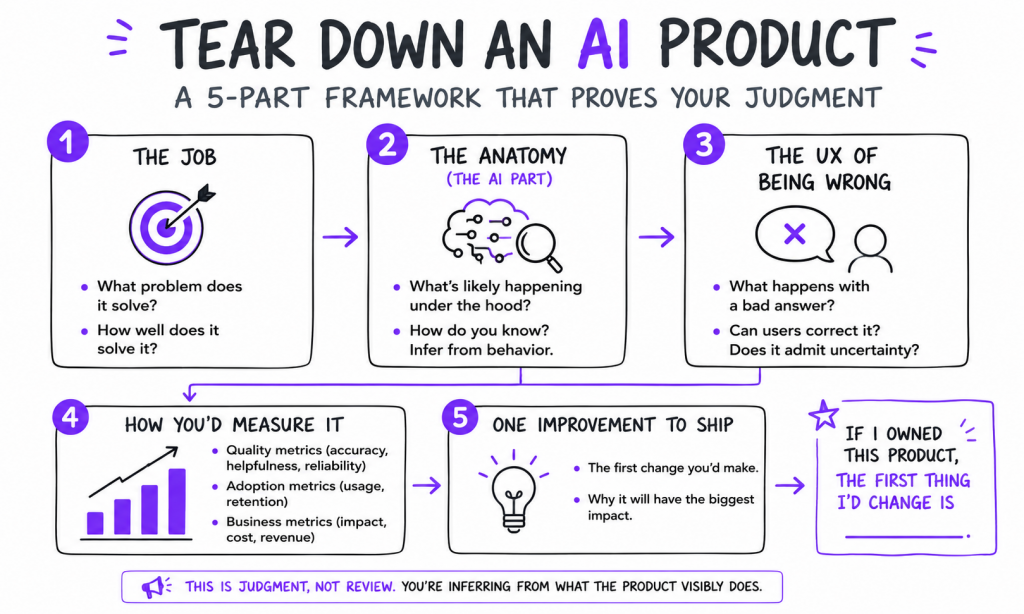
What it proves: you can look at an AI product and reason about how it’s built, where it’s strong, and where it’s fragile. This is product sense made visible, and it’s what separates a real AI PM from someone who just has the vocabulary.
What to build. Pick an AI product you actually use, a support chatbot, an AI writing assistant, a meeting-notes tool, and write a structured teardown. Not a review. A teardown that reasons about the machinery underneath.
Check out this guide to create a Product Teardown
Cover five things:
- The job it does. What user problem does it solve, and how well? One paragraph.
- The anatomy (this is the AI PM part). What’s likely happening under the hood, and how do you know? You are inferring from behavior, and the inference is the skill.
- The UX of being wrong. When it gives a bad answer, what happens? Can the user correct it? Does it admit uncertainty, or hide it? Most AI products live or die here.
- How you’d measure it. The quality, adoption, and business metrics you’d track, the kind of engagement metrics that tell you if it’s actually working.
- One improvement you’d ship, and why.
Here’s what “reasoning about the anatomy” looks like, done for real on a support chatbot, so you can copy the depth:
Anatomy: this is almost certainly retrieval over the help center (RAG), not a model answering from memory. Two tells, its answers quote specific doc language, and it goes stale the week after the docs change. The UX of being wrong: when it doesn’t know, it invents a confident-sounding refund policy instead of routing to a human, which is the worst failure mode for support, a wrong answer that sounds right. The fix I’d ship first: a confidence threshold that hands off to a human below a bar, plus a “was this right?” thumb that feeds back into the eval set.
Notice there are no invented facts there, only reasoning from what the product visibly does. That is exactly the judgment a hiring manager is trying to see.
What to write up (2–3 pages): the five sections, a couple of screenshots, and a clear closing line: “If I owned this product, the first thing I’d change is ___.” That closing opinion is what the interviewer remembers.
Project 3: Write an evals plan (proves you think about quality)
What it proves: you understand that AI is probabilistic, so quality has to be measured, not assumed. Almost no junior candidate does this, which is exactly why it stands out. An eval, in plain terms, is a repeatable test that scores whether an AI feature’s output is actually good.
What to build. Take one AI feature, yours from Project 1, or any product’s feature, and write a short evals plan. This is a document, not code. It is pure product thinking.
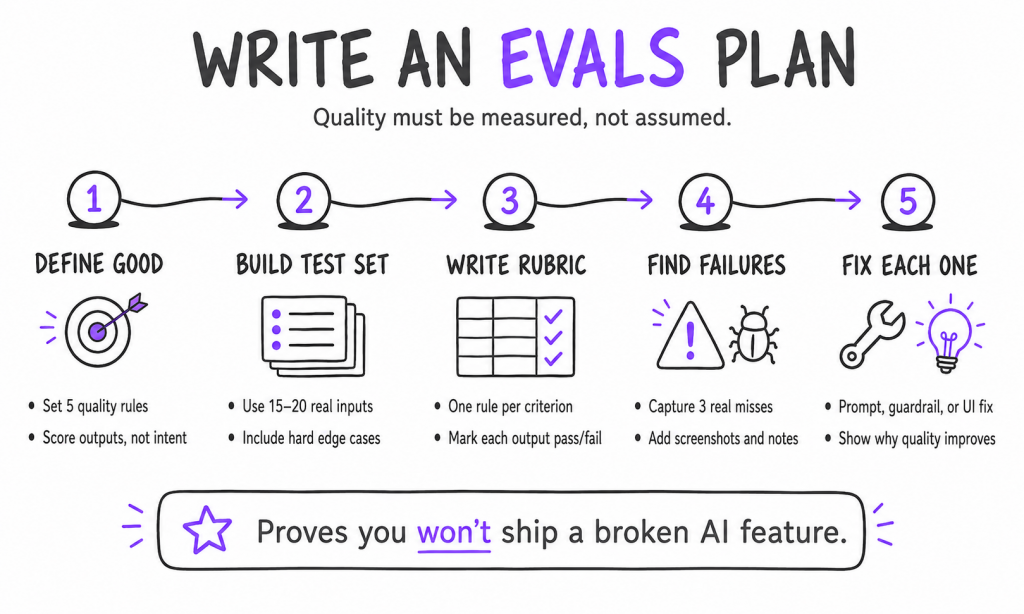
Cover five things, and fill them in for real. Here’s a worked example for the feedback-triage tool:
- Define “good” in five bullets. For the triage tool: themes are present in the input; counts are correct; each quote is real and copied exactly; no themes are invented; the output is readable in under 30 seconds.
- Build a small test set. Write 15 to 20 real inputs it will face, including the hard ones: an empty submission, 200 comments at once, comments in two languages, sarcasm, and one angry rant repeated ten times.
- Write a scoring rubric. One row per “good” criterion, pass or fail per output. For example:Criterion: no invented theme. Pass = every theme traces to at least one real comment. Fail = any theme with no source.*
- Find three real failures. Run the feature against your test set and document three cases where it fails your own rubric, with screenshots. This is the gold. It shows you can break a product on purpose, which is half of quality work.
- Recommend a fix for each failure, a prompt change, a guardrail, a UI change.
What to write up: the rubric, the test set, the three failures with screenshots, and your fixes. A hiring manager reading this thinks, “This person wouldn’t ship a broken AI feature.” That is the entire point.
How to package all three so recruiters actually read them?
Three strong projects with no packaging still lose to one that’s well presented. Recruiters skim, so make skimming pay off.
• One page per project. Clear title, the problem, your decisions, and screenshots. Lead with the outcome, not the process.
• Host it where it’s easy to open. A simple site (a no-code builder is fine), or a clean PDF or deck you can link. Title it “AI Product Management Portfolio, [Your Name]” so it’s searchable.
• Link it everywhere. Your LinkedIn Featured section, your resume, and your email signature.
• Lead with judgment, not tools. Frame each project around the product decisions you made, not the tools you used. Tools change. Judgment is what they’re hiring.
For the broader resume and positioning work around this, our PM portfolio guide goes deeper into presentation.
Career-switchers who built AI products
Where to start
Don’t build all three this weekend. Build one.
Start with Project 1 and ship the feedback-triage tool. A working product is the most convincing thing you can show, and it feeds the other two: you can tear it down and write its evals plan. Write the spec, open a no-code builder, and give it a couple of hours.
When you want a second pair of eyes on your portfolio and become a confident AI Product Manager, or wish more deep dive into AI Product Management, check our curriculum.
So what are you waiting for? Start your first project today.
Happy Building:)
Frequently asked questions
1. What projects should be in an AI PM portfolio?
Three that each prove a different thing: a small AI product you built (proves you can ship), an AI product teardown (proves product judgment), and an evals plan for an AI feature (proves you take quality seriously). Together, they read as an AI PM who can actually do the work. Do not describe it. Do it.
2. Do I need to code to build a portfolio project?
No. You can ship a working AI prototype with no-code and vibe-coding tools, and the teardown and evals projects are documents. None of the three requires writing code. What they require is product judgment, which is the thing being hired.
3. How long does it take to build these projects?
Each is a weekend or less if you scope it tightly. The build takes the longest; the teardown and the evals plan are a focused day each. Three solid projects inside a month is very achievable alongside a job.
4. What matters most in a portfolio project?
The decisions, not the tools. A hiring manager wants to see how you framed the problem, what trade-offs you made, and how you’d measure success. Lead every write-up with judgment, and keep it scannable.
5. Can these projects get me interviews without PM experience?
Yes. Proof of work is exactly how career-switchers get interviews without a PM title. One real thing you built and can reason about beats a resume full of courses, because it answers the only question that matters: can you do the work?
6. What’s the difference between an AI product teardown and a normal one?
A normal teardown reasons about UX, positioning, and growth. An AI teardown adds the layer underneath: what model and method the product likely uses, where its knowledge comes from, and how it behaves when it’s wrong. That extra layer is what signals you’re ready for an AI PM role specifically.